



Description
Download Notepad++ (32-bit) – code editor, programming tool, source code editor, developer tool, text editor
Overview
Notepad++ (32-bit) is a lightweight yet powerful source code editor designed specifically for the Windows operating system. It serves as a robust alternative to the default Notepad application, offering advanced functionality tailored to developers, programmers, and technical users who require efficient code editing capabilities. The app supports a wide range of programming languages, including C, C++, Java, C#, XML, HTML, PHP, and JavaScript, making it a versatile tool across multiple development environments. Its primary purpose is to streamline the process of writing, editing, and managing source code with enhanced readability and productivity features.
Target users include software developers, web designers, system administrators, and students learning programming. The app addresses common challenges such as poor code visibility, lack of syntax highlighting, and inefficient search functions by providing structured tools that improve workflow. Real-world use cases include writing scripts, editing configuration files, debugging code snippets, and preparing documentation. In the broader software development ecosystem, Notepad++ (32-bit) plays a critical role as a foundational utility for rapid prototyping and daily coding tasks.
Developed by the Notepad++ Team, the application has established itself as a trusted tool in the developer community. The developer did not provide additional technical details beyond the core functionality. Despite its compact size and 32-bit architecture, it maintains high performance and compatibility with legacy systems, ensuring accessibility for users working on older Windows platforms.
Key Features & Functionality
- Multi-language Support: Notepad++ (32-bit) supports a broad spectrum of programming and markup languages, enabling developers to work seamlessly across different projects without switching tools.
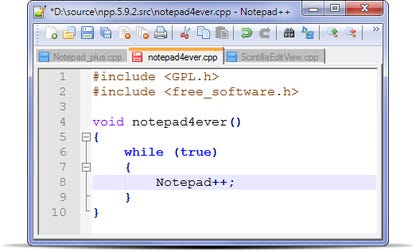
- Syntax Highlighting and Folding: This feature enhances code readability by coloring keywords, strings, and comments differently, while syntax folding allows users to collapse and expand code blocks for better navigation.
- Regular Expression Search: Users can perform advanced text searches using regex patterns, which is essential for finding complex patterns in large codebases or log files.
- WYSIWYG Printing: The editor supports color printing, allowing users to produce visually accurate printouts of their code, ideal for presentations or offline review.
- Unicode Support: Full compatibility with Unicode ensures accurate handling of multilingual text, including non-Latin scripts and special characters.
- Drag-and-Drop Functionality: Files and text can be easily moved between windows or folders, improving workflow efficiency.
- Advanced Editing Tools: Features like brace matching, indent guides, synchronized editing, and customizable language definitions empower users to tailor the environment to their coding style.
These features benefit users by reducing cognitive load, minimizing errors, and accelerating development cycles. For example, a web developer can use syntax highlighting to quickly spot HTML tag mismatches, while a scripter can leverage regex search to find all instances of a specific function call across multiple files.
Interface, UX & Performance
The user interface of Notepad++ (32-bit) is clean, minimal, and highly functional, designed with developers in mind. The layout includes a main editing area, a menu bar, a tabbed document interface, and a status bar at the bottom. Navigation is intuitive, with easy access to file operations, editing tools, and language settings through clearly labeled menus and toolbars.
Visual style emphasizes clarity over ornamentation, using a dark or light theme depending on user preference. The tab system allows multiple files to be opened simultaneously, and switching between them is seamless. Responsiveness is strong across various device categories, including older Windows machines, though the developer did not list formal performance metrics.
Stability is a known strength of the application, with consistent performance during prolonged editing sessions. Although the developer did not specify minimum OS requirements, the app is known to run efficiently on systems with limited resources due to its small footprint of 12.5 MB. Users report smooth operation even with large files, though actual performance may vary based on hardware and background processes.
Platform Compatibility & Technical Requirements
Notepad++ (32-bit) is exclusively available for the Windows platform. It is designed to run on 32-bit Windows systems, which may include older versions such as Windows 7, 8, or 10. The software version is 8.5.1, released on December 12, 2023. The file size is 12.5 MB, making it highly efficient in terms of storage usage.
Specific requirements were not listed. The developer did not specify minimum OS versions or hardware specifications. Compatibility information was not fully disclosed. However, given its lightweight nature and long-standing presence in the developer community, it is likely to function on a wide range of Windows-based systems, including those with limited processing power.
Pros and Cons
Pros
- Lightweight with a small file size of 12.5 MB
- Free to download and use
- Supports a wide range of programming languages
- Advanced syntax highlighting and folding
- Regular expression search for precise text manipulation
- WYSIWYG printing for professional code output
- Full Unicode support for multilingual text
Cons
- Only available for 32-bit Windows systems
- Does not support mobile or cross-platform use
- Specific system requirements were not disclosed
- May lack modern UI elements found in newer editors
- Not updated for 64-bit architecture
FAQ
Is Notepad++ (32-bit) safe to download and install?
Yes, the application is free and widely used by developers worldwide. It is distributed through official channels and does not contain malware or intrusive ads.
Can I use Notepad++ (32-bit) on Windows 11?
While the developer did not specify compatibility with Windows 11, the app is designed for 32-bit Windows systems and may function on newer versions, depending on system configuration.
Is there a mobile version of Notepad++ (32-bit)?
No, the app is currently only available for Windows and does not support Android, iOS, or other mobile platforms.
How often is Notepad++ (32-bit) updated?
The latest version, 8.5.1, was released on December 12, 2023. The update frequency depends on the development team’s roadmap and user feedback.
Can I edit large files with Notepad++ (32-bit)?
Yes, the editor is capable of handling large files efficiently. However, performance may vary based on system resources and file complexity.
Final Thoughts
Notepad++ (32-bit) remains a top-tier choice for developers seeking a fast, reliable, and feature-rich code editor within the Windows environment. Its extensive language support, powerful editing tools, and lightweight design make it ideal for both beginners and experienced programmers. While its 32-bit limitation restricts use on modern 64-bit systems, it continues to serve a niche audience that relies on legacy compatibility and minimal resource usage.
For users working on older hardware or specific development workflows requiring a no-frills editor, Notepad++ (32-bit) delivers exceptional value. It is a secure, free, and efficient tool that enhances productivity without compromising performance.
Download Notepad++ (32-bit) now
Guides & Tutorials for Notepad++ (32-bit)
How to install Notepad++ (32-bit)
- Click the Preview / Download button above.
- Once redirected, accept the terms and click Install.
- Wait for the Notepad++ (32-bit) download to finish on your device.
How to use Notepad++ (32-bit)
This software is primarily used for its core features described above. Open the app after installation to explore its capabilities.
User Reviews for Notepad++ (32-bit) 0
No reviews found


